Last Updated on March 16, 2026 by Vivekanand
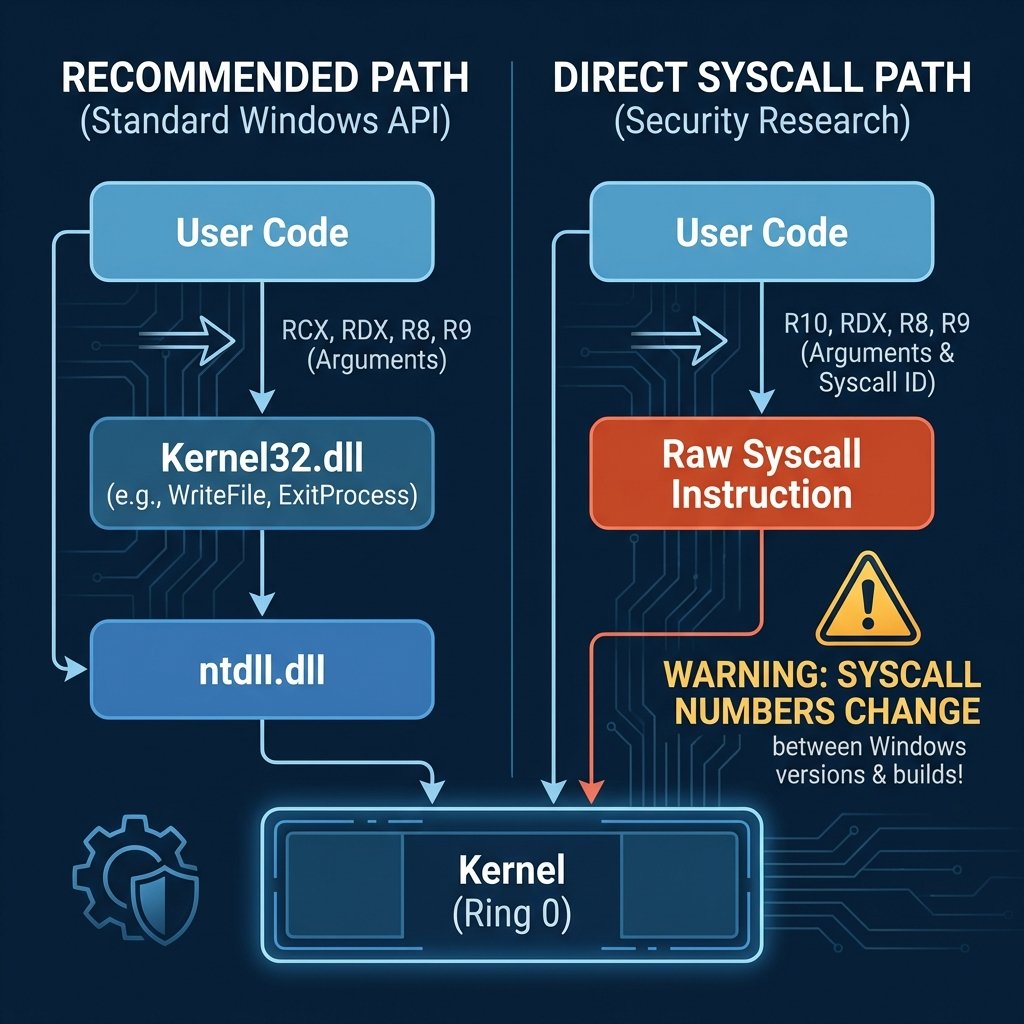
This Windows Hello World tutorial in assembly covers both x64 and ARM64 architectures. Unlike Linux and macOS, where direct syscalls are the standard interface and system call numbers are stable and documented, Windows discourages direct syscalls in user-mode programs. Windows syscall numbers (SSN – System Service Number) can change between builds, versions, and even hotfixes. Instead, the proper approach is to use documented Windows APIs (like WriteFile, ExitProcess) which are exported by kernel32.dll.
However, for educational purposes and to show the true “bare metal” approach used in kernel-mode code and security research, this Windows Hello World guide shows both methods.
For Windows x64 assembly development, Microsoft provides its own native toolchain distributed through Visual Studio, not GNU tools. The native Windows assemblers are:
– ml64.exe for x64 (MASM – Microsoft Macro Assembler)
– armasm64.exe for ARM64
These use Intel/ARM syntax and have different directives than GNU as. Read my Windows Native Assembly Toolchain post to know the tools and how to get them and some basic details.
Method 1: Using Windows APIs (Recommended)
The recommended approach uses Kernel32.dll functions. This is stable across Windows versions and is the proper way to write user-mode applications.
x64 Windows API Example
; Windows x64 Hello World using Kernel32 APIs
; Assemble: ml64 /c hello.asm
; Link: link /subsystem:console hello.obj kernel32.lib

EXTERN GetStdHandle: PROC
EXTERN WriteFile: PROC
EXTERN ExitProcess: PROC

.data
msg     db "Hello, World!", 13, 10
msgLen  equ $ - msg
written dq 0

.code
main PROC
    ; Pre-allocate ALL needed stack space upfront (cleanest pattern):
    ;   32 bytes shadow space (required for every call on Windows x64)
    ;  + 8 bytes for 5th arg (overlapped=NULL for WriteFile, passed on stack)
    ;  + 8 bytes padding to maintain 16-byte alignment
    ; Total: 48 bytes
    sub rsp, 48             ; Shadow space + stack arg slot + alignment

    ; GetStdHandle(-11) - get stdout
    mov rcx, -11            ; STD_OUTPUT_HANDLE
    call GetStdHandle

    ; WriteFile(handle, msg, len, &written, NULL)
    ; Args: rcx=handle, rdx=buf, r8=count, r9=&written, [rsp+32]=NULL
    ; The 5th argument (overlapped) goes on the stack at [rsp+32],
    ; which is above the 32-byte shadow space we pre-allocated.
    mov rcx, rax            ; handle
    lea rdx, msg            ; buffer
    mov r8d, msgLen         ; bytes to write
    lea r9, written         ; bytes written
    mov qword ptr [rsp+32], 0  ; overlapped = NULL (5th arg, on stack)
    call WriteFile

    ; ExitProcess(0)
    xor ecx, ecx
    call ExitProcess
main ENDP

END
Method 2: Direct Syscalls (Advanced/Research)
Warning: Direct syscalls bypass the Windows API layer. Syscall numbers change between Windows versions, builds, and even patches. This technique is primarily used in security research, malware analysis, and kernel development. For more context on cross-platform syscalls, see my Assembly Syscall Tutorial.
ABI Differences
Windows x64
- Uses
rcx,rdx,r8,r9for first 4 arguments (different from System V) - Requires 32-byte “shadow space” on stack for all calls
r10for syscall first argument (becausesyscallclobbersrcx)- Different volatile/non-volatile register set
Windows ARM64
- Follows AAPCS64 more closely (similar to Linux)
- Uses
x0-x7for first 8 arguments x8for syscall number (same as Linux)- But syscall numbers themselves are completely different