Last Updated on February 15, 2026 by Vivekanand
Process loading is the machinery that turns dead code into a running program. In the previous post, we dissected the static anatomy of executable files. We looked at ELF, PE, and Mach-O formats and saw how they organize code and data into sections. But a file on disk is just dead bytes. It doesn’t do anything until the operating system breathes life into it.
This process loading—transforming a static files on disk into a running process in memory—is one of the most complex and fascinating orchestrations in systems programming. It involves the kernel, a user-space loader, the dynamic linker, and a cascade of initialization routines that run long before your main() function is ever called.
In this post, we’re going to trace that journey. We’ll answer the fundamental question: What actually happens when you execute a program?
Table of Contents
graph TD
    User([User Request]) -->|execve / CreateProcess| Kernel[OS Kernel]
    Kernel -->|Map| Memory[Virtual Memory]
    Kernel -->|Parse| Header[File Header]
    Header -->|Identify| Linker[Dynamic Linker]
    Kernel -->|Start| Linker
    Linker -->|Load| Libs[Shared Libraries]
    Linker -->|Relocate| Symbols[Resolve Symbols]
    Linker -->|Jump| Entry["Entry Point (_start)"]
    Entry -->|Init| LibC[C Runtime]
    LibC -->|Call| Main[main]
1. The Process Loading Handoff: From User to Kernel
When you run a command like ./my_program in your terminal, or double-click an application icon, you aren’t directly starting the program. You are asking the operating system to start it for you. This request triggers a system call that transitions control from user space to kernel space.
Linux: The execve Family
On Linux, the journey begins with the execve system call (or one of its siblings).
// simplified prototype
int execve(const char *pathname, char *const argv[], char *const envp[]);
When the kernel receives this call, it:
- Reads the file header: It looks at the first few bytes (magic number). If it sees
x7fELF, it knows it’s dealing with an ELF binary. If it sees#!, it knows it’s a script and invokes the interpreter specified (like/bin/bashor/usr/bin/python). - Clears the old process: It discards the memory map of the current process (the shell that called likely called
fork()just beforeexecve()). - Maps the new executable: It doesn’t load the whole file into RAM. Instead, it “maps” the file into the virtual address space (using mechanisms similar to
mmap). This is “Demand Paging”—pages are only read from disk when the CPU actually tries to access them.
Windows: CreateProcess
Windows is slightly different. The CreateProcess API is the standard entry point. It parses the PE header, creates a new process object in the kernel, and creates the initial thread (the main thread). Unlike Linux’s fork/exec model, CreateProcess handles both creation and loading in one go.
macOS: posix_spawn
macOS, being UNIX-certified, supports execve, but under the hood (and in modern apps), posix_spawn is often preferred for efficiency. The kernel (XNU) parses the Mach-O header. If the binary is “fat” (Universal Binary containing both x86_64 and arm64 code), the kernel selects the slice that matches the current CPU architecture.
The common thread?
In all cases, the kernel’s job is to set up the Virtual Address Space. It creates a clean slate of memory for the new process and tells the memory management unit (MMU) where to find the code and data. But the kernel usually doesn’t start executing your program’s code directly. Instead, it spots a special section in your binary asking for a “interpreter” or “dynamic linker.”
2. Process Loading Phase 1: Virtual Memory & ASLR
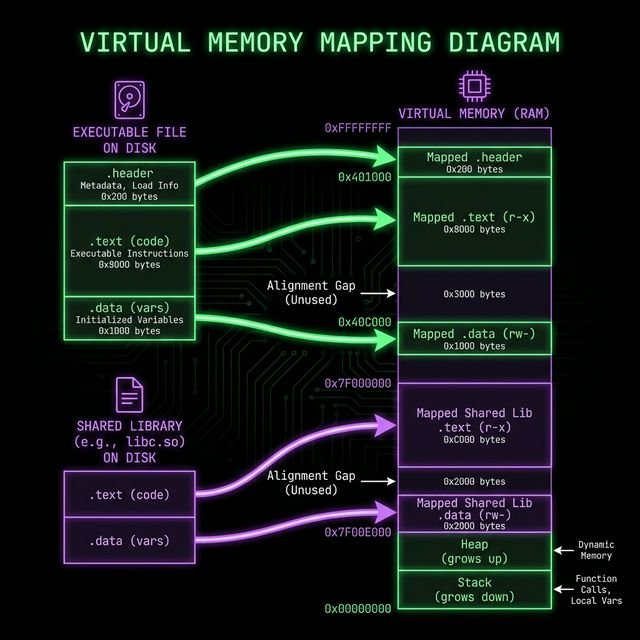
Before we talk about the linker, we must understand where things end up in memory during process loading.
In the old days, a program might expect to always be loaded at a specific address (e.g., 0x400000). This made things simple but insecure. If an attacker knew exactly where your system() function was, they could easily jump to it (Return-to-Libc attacks).
Modern OSes use ASLR (Address Space Layout Randomization). Every time you run the program, the “Image Base”—the starting address of the executable in virtual memory—is randomized.
- Position Independent Code (PIC): This is why compiling with
-fPICis crucial for shared libraries. The code must run correctly regardless of where it is placed in memory. - Relocations: If the code isn’t position-independent (like many main executables), the loader must apply “relocations”—modifying pointers in the code to point to the correct randomized addresses.
You can see this randomization in action on Linux by reading /proc/self/maps in a loop:
$ cat /proc/self/maps | grep /bin/cat
55d3e0f09000-55d3e0f0b000 r--p 00000000 08:01 262601 /usr/bin/cat
$ cat /proc/self/maps | grep /bin/cat
560a8b9e6000-560a8b9e8000 r--p 00000000 08:01 262601 /usr/bin/cat
Notice the starting address changes (55d3... vs 560a...). The OS loader handled this offset invisibly.
3. Process Loading Phase 2: The Dynamic Linker
If you check dependencies, you’ll see the shared libraries your program needs.
- Linux:
ldd /bin/ls - macOS:
otool -L /bin/ls - Windows:
dumpbin /dependents myprogram.exe
The kernel doesn’t load these libraries. It delegates this job to the Dynamic Linker (or Dynamic Loader).
Linux (ELF): ld-linux.so
When the kernel maps an ELF executable, it checks for a .interp section. This section contains a path, usually /lib64/ld-linux-x86-64.so.2. The kernel maps this file into memory as well, and then… it starts executing the linker, not your program!
The linker (interpreter):
- Reads the ELF header of your program.
- Crawls the dependencies (
DT_NEEDEDentries in the.dynamicsection). - Finds libraries on disk (checking
LD_LIBRARY_PATH, RPATH, and/etc/ld.so.cache). - Maps libraries into memory (again, using
mmap). - Performs Relocations: Adjusts pointers in the code to point to the actual addresses of functions in these libraries (via the Global Offset Table or GOT).
macOS (Mach-O): dyld
On macOS, the kernel (XNU) parses Mach-O load commands. It looks for LC_LOAD_DYLINKER, which points to /usr/lib/dyld. The kernel maps dyld into the process address space and transfers control to _dyld_start.dyld then walks the LC_LOAD_DYLIB commands to find dependencies, using paths like @rpath and @loader_path to locate dylibs in the app bundle or system paths.
Windows (PE): ntdll.dll (Ldr)
On Windows, the “loader” logic is baked into ntdll.dll, which is loaded into every process. The kernel (ntoskrnl) maps ntdll.dll and the executable. It then creates the primary thread, which starts running code in ntdll (specifically LdrInitializeThunk). This routine walks the Import Table in the PE header, locating required DLLs (kernel32.dll, user32.dll) and mapping them.
4. Finalizing Process Loading: Initialization & Entry Point
Everything is loaded. Memory is mapped. Relocations are applied. Now, surely, main() starts?
No.
If the OS jumped directly to main(), your C standard library (libc) wouldn’t be initialized. malloc wouldn’t work. printf would crash. Arguments (argc, argv) wouldn’t be set up.
Linux: _start
The true entry point of a Linux program is a symbol usually called _start. This is provided by the C runtime (crt1.o).
_start: Assembly code that clearsebp(related to stack frames), aligns the stack, and pushesargc,argv,envp.__libc_start_main: A function inglibc. It initializes threading, registers destructors (DT_FINI), and calls global constructors (__attribute__((constructor))/.init_array).main(): Finally, your code runs!exit(): Whenmainreturns, control goes back tolibc, which runs destructors and asks the kernel to terminate the process.
Windows: mainCRTStartup
In Visual Studio helper, the entry point is often mainCRTStartup (or WinMainCRTStartup).
LdrInitializeThunk(ntdll) initializes the heap and loader lock.RtlUserThreadStart(ntdll) sets up the thread.BaseThreadInitThunk(kernel32) is called.- Entry Point (PE Header): Pointing to
mainCRTStartup. - It initializes the C Runtime (allocating handles, environment).
- Calls
main().
macOS: _dyld_start
_dyld_start: The very first instruction executed in user space (insidedyld).dyld::bootstrap: Runs all dynamic linking fixups.LC_MAIN:dyldlooks for theLC_MAINload command in the Mach-O header to find the executable’s offset.- It jumps to that offset (libSystem initialization), which eventually calls
main().
Conclusion
The “simple” act of process loading and running a program is a symphony of OS cooperation. It involves parsing headers, mapping memory, resolving symbols, and initializing runtimes—all before your first line of code runs. Understanding this sequence is the key to debugging “missing library” errors, writing packers/obfuscators, and understanding how malware hides itself.