Last Updated on February 14, 2026 by Vivekanand
In Part 3 of this series, we examined how functions organize themselves on the stack. But before a program can even make its first function call—or even execute its first instruction—it exists as a static file on your disk.
How does the operating system know how to take that file and turn it into a running process? The answer lies in the Executable File Format.
In this guide (Part 4), we’ll dissect the three major executable file formats that power our world: ELF (Linux/BSD), PE (Windows), and Mach-O (macOS). Understanding these containers is the prerequisite to understanding program startup, dynamic linking, and reverse engineering.
Table of Contents
The “Container” Analogy for Executable Files
Think of an executable file format not as a linear list of instructions, but as a complex shipping container.
- Headers: The manifest taped to the outside (Architecture, Entry Point, Required OS).
- Segments: The big cargo sections loaded into memory (Code vs. Data).
- Sections: The categorized items inside the cargo (Read-only strings, Global variables, Debug info).
The OS Loader’s job is to read the manifest, allocate memory, and unpack the cargo exactly where it needs to go.
graph TD
    subgraph ELF [ELF File Layout]
        E1[ELF Header]
        E2[Program Header Table]
        E3[.text Section]
        E4[.data Section]
        E5[Section Header Table]
    end

    subgraph PE [PE File Layout]
        P1[DOS Header]
        P2[PE Header]
        P3[Section Table]
        P4[.text Section]
        P5[.data Section]
    end

    subgraph MACHO [Mach-O File Layout]
        M1[Mach Header]
        M2[Load Commands]
        M3[__TEXT Segment]
        M4[__DATA Segment]
    end

    style E1 fill:#2d3436,stroke:#74b9ff,stroke-width:2px
    style P1 fill:#2d3436,stroke:#ff7675,stroke-width:2px
    style M1 fill:#2d3436,stroke:#55efc4,stroke-width:2px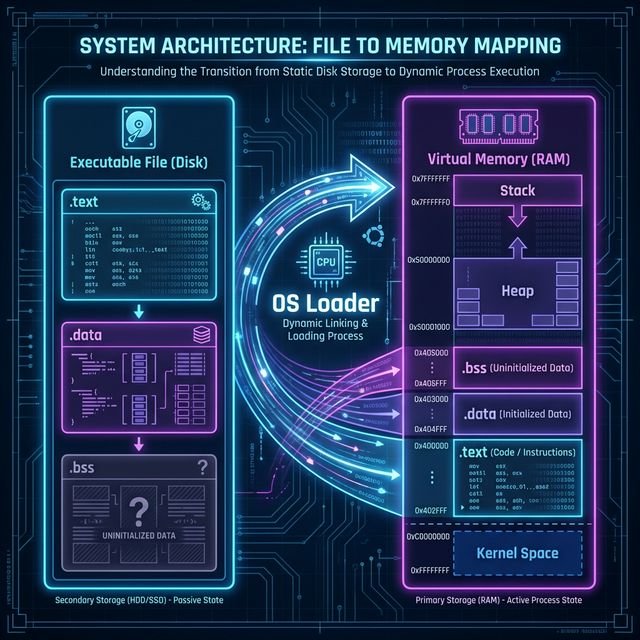
The Big Three Executable File Formats
| Format | Full Name | OS Family | Origins |
|---|---|---|---|
| ELF | Executable and Linkable Format | Linux, Android, BSD, Consoles (PS4/5) | Unix System V |
| PE | Portable Executable | Windows, UEFI | VAX/VMS (COFF) |
| Mach-O | Mach Object | macOS, iOS, watchOS | NeXTSTEP / Mach Kernel |
Although they differ in binary layout, all these executable file formats solve the exact same problems:
- Where does execution start? (Entry Point)
- What memory needs to be allocated? (Segments)
- What external code is needed? (Dynamic Linking)
1. ELF: The Universal Standard
ELF is the workhorse of the Unix world. It’s clean, flexible, and extremely well-documented.
Structure
An ELF file consists of:
- ELF Header: Magic bytes (
0x7F 'E' 'L' 'F'), architecture info (x86-64/ARM64), and the Entry Point Address (virtual address where_startusually lives). - Program Header Table (Segments): Instructions for the OS Loader. It says “Take bytes 0x1000 to 0x2000 from the file and map them to address 0x400000 with Read/Execute permissions.”
- Section Header Table (Sections): Metadata for the Linker. It defines logical groupings like
.text(code) or.data(variables).
Key Inspection Tools (Linux)
# View the Header (Entry Point is key!)
readelf -h /bin/ls

# View Segments (Loader View)
readelf -l /bin/ls

# View Sections (Linker View)
readelf -S /bin/ls
2. PE: The Windows Legacy
Portable Executable (PE) format is actually a modified version of the ancient COFF (Common Object File Format).
Structure
PE headers are notoriously complex because they preserve backward compatibility all the way back to DOS.
- DOS Header: Starts with
MZ(Mark Zbikowski). It includes a tiny DOS program that prints “This program cannot be run in DOS mode.” - PE Header: Starts with
PE. Contains the “ImageBase” (preferred load address) and “AddressOfEntryPoint”. - Data Directories: A critical array pointing to Import Tables, Export Tables, and Resources (icons, menus).
- Section Table: Defines
.text,.data,.rsrc(resources).
Key Inspection Tools (Windows)
:: Using built-in dumpbin (Visual Studio Command Prompt)
dumpbin /headers myapp.exe

:: 3rd Party Recommendation
:: "PE-Bear" is an excellent visual tool for exploring PE structures.
3. Mach-O: The Apple Way
Mach-O (Mach Object) reflects its NeXTSTEP heritage. It organizes data into “Load Commands” rather than fixed tables.
Structure
- Mach Header: Magic bytes (
0xFEEDFACFfor 64-bit), CPU type (ARM64/x86-64). - Load Commands: A variable-length list of commands that tell the kernel what to do.
LC_SEGMENT_64: Map a segment into memory.LC_MAIN: Specifies the entry point (modern replacement forLC_UNIXTHREAD).LC_LOAD_DYLIB: Load a dynamic library (likelibSystem.B.dylib).
Key Inspection Tools (macOS)
# View Header
otool -hv /bin/ls

# View Load Commands
otool -l /bin/ls
Comparison: The Critical Sections
No matter the format, you will always find these three fundamental regions, just named differently:
| Concept | ELF Name | PE Name | Mach-O Name | Purpose |
|---|---|---|---|---|
| Executable Code | .text | .text | __TEXT,__text | Your compiled assembly instructions. Read-Only + Executable. |
| Global Variables | .data | .data | __DATA,__data | Initialized global/static variables (int x = 5;). Read/Write. |
| Uninitialized Data | .bss | .bss* | __DATA,__bss | Global variables that are zero (int x;). Takes no space on disk, only in memory. |
| Read-Only Data | .rodata | .rdata | __TEXT,__const | Constants and string literals. |
* Note: PE often merges BSS into other sections or handles it via VirtualSize > SizeOfRawData.
Why This Matters for “Program Startup”
We are analyzing these formats for one specific reason: to understand Program Startup.
When you run a program, the kernel:
- Reads the Header to ensure it supports the architecture.
- Maps the Segments into virtual memory based on the tables we just saw.
- Calculates the Entry Point (applying ASLR randomization if needed).
- Jumps to that Entry Point address.
That exact moment—the jump to the Entry Point—is where the “Executable Format” job ends and the Program Startup code begins.
In Part 5, we will start execution at that exact instruction (often called _start) and trace the fascinating journey that happens before your main() function ever gets called. If you want to review how arguments are passed during this process, check out Part 2: Calling Conventions.
References & Further Reading