Last Updated on February 15, 2026 by Vivekanand
In the previous post, we watched the operating system load our executable and its dependencies into memory. We saw files become segments in virtual memory. But simply loading the code isn’t enough.
If your program calls printf, it needs to jump to the memory address where printf lives. But thanks to ASLR (Address Space Layout Randomization) and shared libraries, that address changes every time you run the program!
How can the compiler generate a call instruction to a target it doesn’t know?
The answer lies in a clever system of indirection known as Dynamic Linking, powered by two critical data structures: the Global Offset Table (GOT) and the Procedure Linkage Table (PLT).
Table of Contents
The Problem: Dynamic Linking & PIC
In the old days of static linking, life was simple. The linker knew exactly where every function would be in the final executable. call printf was just call 0x401230.
Shared libraries changed that. To save memory, we want one copy of libc.so in physical RAM, shared by every running process. But each process might map it to a different virtual address. This means the code in libc cannot assume hardcoded addresses. It must be Position Independent Code (PIC).
This flexibility is the heart of dynamic linking. Even inside your main executable (compiled with -fPIE), we don’t know where external functions will land. We need a way to look them up at runtime.
The Solution: Indirection tables
The trick is to verify that “All problems in computer science can be solved by another level of indirection.”
Instead of calling printf directly, we call a stub that looks up the address of printf. This mechanism allows dynamic linking to handle address resolution transparently.
1. The Global Offset Table (GOT)
The GOT is a section (.got or .got.plt) in your executable’s Data Segment. It is basically an array of pointers.
- It is run-time writable (initially).
- The Dynamic Linker fills these slots with the actual addresses of global variables and library functions.
2. The Procedure Linkage Table (PLT)
The PLT is a section (.plt) in your executable’s Code Segment. It contains a small “stub” of code for every external function you call.
- It is read-only and executable.
- It acts as a trampoline used by the dynamic linking process.
When you write printf("Hi"), the compiler actually emits call printf@plt.
The “Lazy Binding” Dance
Resolving symbols is slow. A typical C++ program might link against thousands of functions but only call a few dozen. To speed up startup, Linux uses Lazy Binding: we only resolve a function’s address the first time it is called. This optimization is a key feature of ELF dynamic linking.
Here is the step-by-step choreography of your first call to printf.
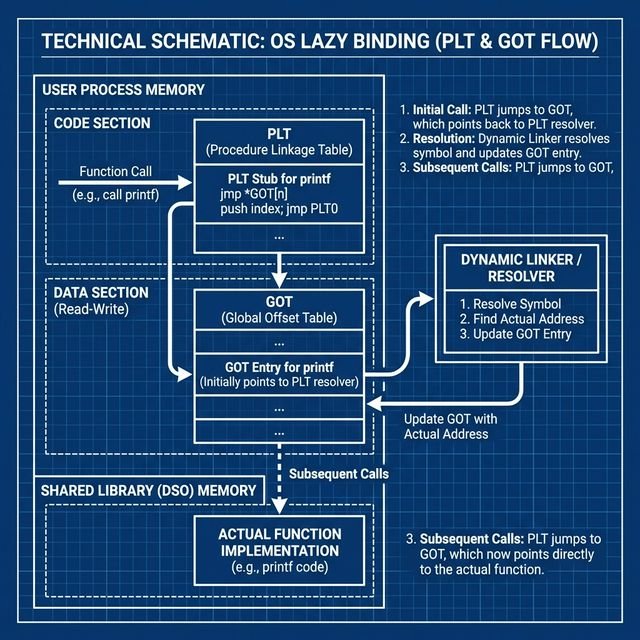
sequenceDiagram
    participant Main as Main Code
    participant PLT as PLT Stub (printf@plt)
    participant GOT as GOT Entry
    participant Resolver as Dynamic Linker (_dl_runtime_resolve)
    participant Libc as Libc (printf)

    Note over Main, Libc: First Call to printf
    Main->>PLT: Call printf@plt
    PLT->>GOT: Jump to *GOT[n]
    Note right of GOT: Initial Value: Points back to PLT+6
    GOT-->>PLT: Returns to PLT (PUSH instruction)
    PLT->>PLT: Push Relocation ID
    PLT->>Resolver: Jump to Resolver
    Resolver->>Resolver: Find "printf" address
    Resolver->>GOT: Update GOT[n] with 0xDEADBEEF (Real Address)
    Resolver->>Libc: Jump to printf (0xDEADBEEF)

    Note over Main, Libc: Second Call to printf
    Main->>PLT: Call printf@plt
    PLT->>GOT: Jump to *GOT[n]
    Note right of GOT: Value is now 0xDEADBEEF
    GOT-->>Libc: Jumps directly to printf
Step 1: The Call
Your code calls the PLT stub.
call 0x401030 <printf@plt>Step 2: The PLT Trampoline
The PLT stub typically looks like this (x86-64):
0x401030: jmp QWORD PTR [rip+0x2fe2]  # Jump to address stored in GOT
0x401036: push 0x0                    # Push relocation index (ID)
0x40103b: jmp 0x401020                # Jump to PLT resolution stub
Step 3: The GOT Lookup (First Time)
The jmp looks at the GOT slot. The crucial detail: At startup, the GOT slot points back to the instruction immediately following the jump!
So, the jmp effectively does nothing but fall through to 0x401036.
Step 4: The Resolver
The code pushes an ID (telling the linker which function this is) and jumps to the resolver routine in the dynamic linker. The linker:
- Looks up the symbol “printf” in loaded libraries.
- Finds its actual address (e.g.,
0x7ffff7a4c370). - Patches the GOT slot with this real address.
- Jumps to
printf.
This completes the dynamic linking resolution for this symbol.
Step 5: Subsequent Calls
The next time you call printf@plt:
- You jump to the PLT.
- The PLT jumps to the address in the GOT.
- The GOT now contains
0x7ffff7a4c370. - You go straight to
printf. No overhead!
Windows Difference: The IAT
Windows uses a structure called the Import Address Table (IAT). It functions similarly to the GOT, but with a key difference: Windows executables (by default) bind imports at load time, not lazily. When ntdll loads your EXE, it walks the Import Table, finds all DLLs, looks up all functions, and fills the IAT before main() starts.
This makes startup slightly slower but runtime execution deterministic. However, Windows does support dynamic linking optimization via “Delay-Loaded DLLs” to mimic Linux’s behavior.
Security: RELRO (Relocation Read-Only)
The GOT is a juicy target for attackers. If I can overwrite the GOT entry for printf with the address of system, the next time your program tries to print something, it executes a shell instead! This is a common dynamic linking exploit vector.
To mitigate this, we have RELRO:
- Partial RELRO (Default): The non-PLT parts of the GOT are read-only, but the PLT-GOT (used for functions) remains writable to allow lazy binding.
- Full RELRO: The linker resolves everything at startup (like Windows). The entire GOT is then marked Read-Only.
- Pros: GOT is immutable. Exploitation is much harder.
- Cons: Slower startup.
- Enable with:
gcc -Wl,-z,relro,-z,now
Conclusion
Dynamic linking is a trade-off. We gain memory efficiency and flexible updates at the cost of complexity. The PLT creates the trampoline, and the GOT holds the destination. Together, they allow our static code to dance with dynamic libraries.
In the next post, we’ll look at System Calls: the final frontier where our application talks to the kernel to actually do something (like reading a file or sending a packet).